Microsoft Teams Integration with ServiceNow – FINT Solutions
<style>
.blog-details-area.pt-5.pb-5{background-color: #f4f8fd; padding-bottom:0; }
.blog-details-desc .article-content .benefits h4 { font-size:15px;padding-top:10px; margin-bottom:8px; }
.blog-details-desc .text-center.mt-5.mb-5 { margin-bottom:0 !important; }
.blog-details-desc .article-content .benefits p { line-height:22px;}
.article-image{display:none}
.hero {
background: linear-gradient(135deg, #0f172a 0%, #1e293b 100%);
color: white;
padding: 100px 0 120px;
clip-path: polygon(0 0, 100% 0, 100% 90%, 0% 100%);
}
.list-unstyled{padding-left: 25px !important;}
.list-unstyled:before{ content: "\e9f4" !important;
font-family: boxicons !important;
font-size: 16px;
top: 0 !important;
width: 0 !important;
height: 0 !important;
color: #ff1628;}
.icon-box:before{content: "\e9f6" !important;
font-family: boxicons !important;
font-size: 30px;}
.bar {
height: 5px;
width: 90px;
background: #cdf1d8;
margin: 20px auto;
position: relative;
border-radius: 30px;
}
.card-custom {
border: none !important;
box-shadow: 0 10px 40px rgba(0,0,0,0.04);
transition: all 0.3s ease;
height: 100%;
}
.card-custom:hover {
transform: translateY(-10px);
box-shadow: 0 20px 50px rgba(0,0,0,0.08);
}
.icon-box {
width: 45px;
height: 45px;
background: rgba(56, 189, 248, 0.1);
color: #38bdf8;
border-radius: 15px;
display: flex;
align-items: center;
justify-content: center;
font-size: 1.5rem;
margin-bottom: 20px;
}
.icon-box1 {
width: 45px;
height: 45px;
background: rgba(56, 189, 248, 0.1);
color: #38bdf8;
border-radius: 15px;
display: flex;
align-items: center;
justify-content: center;
font-size: 1.5rem;
margin-bottom: 20px;
}
.badge-ai {
background: rgba(56, 189, 248, 0.2);
color: #38bdf8;
font-weight: 700;
padding: 8px 16px;
border-radius: 50px;
text-transform: uppercase;
font-size: 0.75rem;
letter-spacing: 1px;
}
.table-custom th { background: #0f172a; color: white; border: none; padding: 15px; }
.table-custom td { padding: 15px; vertical-align: middle; border-bottom: 1px solid #f1f5f9; }
.footer-banner {
background: #0f172a;
color: white;
padding: 60px 0;
margin-top: 80px;
}
.btn-modern {
padding: 12px 35px;
border-radius: 12px;
font-weight: 600;
transition: 0.3s;
}
.highlight {
background: #eef4ff;
border-left: 4px solid #00196c;
border-right: 4px solid #00196c;
padding: 25px;
border-radius: 10px;
height: 100%;
}
.br-3{
border-radius: 10px;
}
.use-case {
display: grid;
grid-template-columns: 1fr 1fr;
gap: 40px;
align-items: center;
overflow: hidden;
transition: border-color 0.3s;
}
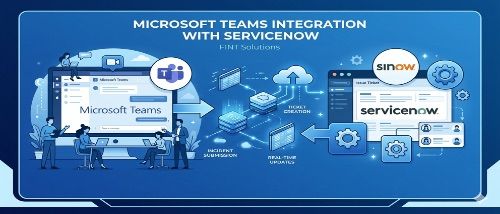
</style><section class="mt-n5" style="margin-top:-50px;"><div class="row g-4"><div class="col-12"><div class="card card-custom p-5 bg-white border"><div class="row align-items-center"><div class="col-lg-6 order-2 order-lg-1"><p>In today's environment where people work from different places, collaboration tools are not just nice to have-they are essential for doing work efficiently. Microsoft Teams has become a central platform for communication, but it truly shines when it connects well with other important systems used by enterprises like ServiceNow.</p><p>However, this approach quickly showed its limits when applied to real-world scenarios. It became clear that the real challenge was not the prompt itself, but everything surrounding it.</p></div><div class="col-lg-6 order-1 order-lg-2"><p><img src="/uploads/microsoft_teams_integration_with_service_now_6c3838fa93_01d792a956.jpeg" alt="microsoft_teams_integration_with_service_now_6c3838fa93.jpeg"></p></div></div></div></div><div class="col-md-4"><div class="card card-custom p-4"><div class="icon-box"> </div><h3 class="fw-bold">Why Microsoft Teams Integration Matters</h3><p class="text-muted small">Many companies struggle with issues such as:</p><ul><li class="list-unstyled">Losing track of conversations when shifting between different apps</li><li class="list-unstyled">Delays caused by using multiple tools</li><li class="list-unstyled">Missing out on key updates and approvals</li></ul><p>By bringing enterprise workflows <i>directly into Teams</i>, users can respond to information right away -<strong>without having to leave their collaboration space</strong>.</p></div></div><div class="col-md-4"><div class="card card-custom p-4"><div class="icon-box"> </div><h3 class="fw-bold">Key Features of the Integration</h3><ul><li class="list-unstyled">Incident alerts are sent directly to Teams</li><li class="list-unstyled">Approvals directly from chat</li><li class="list-unstyled">Virtual Agent chatbot for quick support</li><li class="list-unstyled">Real-time updates are available without the need to log into ServiceNow</li></ul><p>This works well in controlled environments and simple demonstrations.</p></div></div><div class="col-md-4"><div class="card card-custom p-4"><div class="icon-box"> </div><h3 class="fw-bold">Business Impact</h3><ul><li class="list-unstyled">Decisions can be made more quickly</li><li class="list-unstyled">Less effort is needed for operations</li><li class="list-unstyled">Enterprise tools are adopted more widely</li></ul><p>Teams evolves from just a chat app into a smart and efficient <strong>digital workspace</strong>.</p></div></div></div></section><section class="py-4 benefits"><h2 class="section-title text-center mb-3">Business Benefits</h2><div class="bar"> </div><div class="row g-4"><div class="col-md"><div class="card card-custom p-3 br-3"><h4>Productivity</h4><p>No need to switch between tools</p></div></div><div class="col-md"><div class="card card-custom p-3 br-3"><h4>Decision Making</h4><p>Real-time approvals and notifications</p></div></div><div class="col-md"><div class="card card-custom p-3 br-3"><h4>Cost Savings</h4><p>Automation reduces manual effort</p></div></div><div class="col-md"><div class="card card-custom p-3 br-3"><h4>Employee Experience</h4><p>Services available where users already work</p></div></div><div class="col-md"><div class="card card-custom p-3 br-3"><h4>Innovation Platform</h4><p>Foundation for AI, Copilot, and automation</p></div></div></div></section><section class="py-4"><h2 class="section-title text-center mb-3">How Integration Enables Innovation</h2><div class="bar"> </div><div class="row g-4"><div class="col-md"><div class="card card-custom p-4 br-3"><div class="icon-box1">A</div><h4>Work Happens in the Flow of Conversation</h4><p>Employees can trigger workflows directly through chat instead of using portal-based interfaces.</p></div></div><div class="col-md"><div class="card card-custom p-4 br-3"><div class="icon-box1">B</div><h4>AI-Driven Automation</h4><p>AI agents and copilots perform repetitive tasks and provide smart responses.</p></div></div><div class="col-md"><div class="card card-custom p-4 br-3"><div class="icon-box1">C</div><h4>Unified Digital Workplace</h4><p>ServiceNow services are placed directly inside Teams, creating a single place to work.</p></div></div></div></section><section class="py-4"><h2 class="section-title text-center mb-3">Real-World Use Cases</h2><div class="bar"> </div><div class="row g-4"><div class="col-md-6"><div class="card card-custom p-4 br-3"><div class="icon-box1">1</div><h3>IT Service Management (ITSM)</h3><h4> <strong>Use Case:</strong></h4><p>Raising and resolving IT tickets via Teams</p><h4><strong>How it works:</strong></h4><ul><li>User chats with ServiceNow </li><li>Virtual Agent in Teams Tickets are created instantly </li><li>Updates are pushed back into Teams</li></ul><h4><strong>Innovation Impact:</strong></h4><p>Reduced workload Faster resolution Increased use of self-service</p></div></div><div class="col-md-6"><div class="card card-custom p-4 br-3"><div class="icon-box1">2</div><h3>Employee Self-Service (Employee Center in Teams)</h3><h4><strong>Use Case:</strong></h4><p>Accessing services like HR, IT, and payroll within Teams</p><h4><strong>How it works:</strong></h4><ul><li>ServiceNow Employee Center embedded as a Teams app</li><li>Employees can search for knowledge and request services</li><li>Provides a Centralized portal inside Teams</li></ul><h4><strong>Innovation Impact:</strong></h4><ul><li>One-stop experience for employees</li><li>Less reliance on multiple tools</li></ul></div></div><div class="col-md-4"><div class="card card-custom p-4 br-3"><div class="icon-box1">3</div><h3>Incident Management & Collaboration</h3><h4> <strong>Use Case:</strong></h4><p>Handling critical outages</p><h4><strong>How it works:</strong></h4><ul><li>Incident alerts are sent to Teams channels</li><li>Teams is used for collaboration in a war room setting</li><li>Updates are synchronized with ServiceNow</li></ul></div></div><div class="col-md-4"><div class="card card-custom p-4 br-3"><div class="icon-box1">4</div><h3>Approval Workflows in Teams</h3><h4><strong>Use Case:</strong></h4><p>Approving requests (change, access, procurement)</p><h4><strong>How it works</strong>:</h4><ul><li>Notification appears in Teams</li><li>Approve/Reject directly from message</li></ul><h4><strong>Innovation Impact:</strong></h4><ul><li>Eliminate email delays</li><li>Speeds up business workflows</li></ul></div></div><div class="col-md-4"><div class="card card-custom p-4 br-3"><div class="icon-box1">5</div><h3>AI-Powered Virtual Agent</h3><h4><strong>Use Case:</strong></h4><p>Conversational support</p><h4><strong>How it works:</strong></h4><ul><li>User asks question in Teams</li><li>AI retrieves knowledge or executes workflow</li></ul><h4><strong>Innovation Impact:</strong></h4><ul><li>AI-driven enterprise support</li><li>Cost reduction</li></ul></div></div></div></section><section class="py-4"><h2 class="section-title text-center mb-3">Solutions that FINT Deliver with Teams + ServiceNow Integration:</h2><div class="use-case py-3"><div class="use-case-content"><h3>01 - Conversational IT Service Desk (ChatOps)</h3><p>Instead of submitting tickets through portals, users can simply message a bot in a chat interface to report issues, request access, or get assistance. The bot interacts in a conversational way, gathers the needed details, suggests solutions using a knowledge base, and can automatically create or update tickets</p></div><div class="use-case-img"><img src="/uploads/msteams_service_now1_4a3b8e0c8c.png" alt="msteams-service-now1.png"></div></div><div class="use-case py-3" style="background-color:#fff;"><div class="use-case-img"><img src="/uploads/msteams_service_now2_6088bc67d8.png" alt="msteams-service-now2.png"></div><div class="use-case-content"><h3>02 - Employee Self-Service Hub (Inside Teams)</h3><p>The Employee Self-Service Hub integrates ServiceNow with Microsoft Teams to provide a centralized, in-app experience where employees can access IT, HR, and business services directly within Teams.</p></div></div><div class="use-case py-3"><div class="use-case-content"><h3>03 - Approval Management in Teams</h3><p>Approval Management within Microsoft Teams enables managers and stakeholders to review and action on requests directly within the teams</p><p>The approval request is related to <strong>“Pre-Prod UAT Testing”</strong> and includes key details such as the task number, due date, and current state. Users can directly review, approve, or reject the request within Teams without switching to the ServiceNow portal</p></div><div class="use-case-img"><img src="/uploads/msteams_service_now3_852f6590dc.png" alt="msteams-service-now3.png"></div></div><div class="use-case py-3" style="background-color:#fff;"><div class="use-case-img"><img src="/uploads/msteams_service_now4_a3b38dbc02.png" alt="msteams-service-now4.png"></div><div class="use-case-content"><h3>04 - Incident Management</h3><p>Employees can report incidents through chat or bots, which automatically create records in ServiceNow. IT teams receive instant updates, allowing them to view, assign, update, and resolve incidents together without switching tools.</p><p>The notification provides complete incident details, including the incident number, short description, current state, assigned user, assignment group, and latest work notes</p></div></div><div class="use-case py-3"><div class="use-case-content"><h3>05 - AI-Powered Virtual Assistant</h3><p>The virtual assistant can understand user questions, provide instant answers, automate requests, and create or update tickets without human involvement.</p></div><div class="use-case-img"><img src="/uploads/msteams_service_now5_4309d04aac.png" alt="msteams-service-now5.png"></div></div><div class="use-case py-3" style="background-color:#fff;"><div class="use-case-img"><img src="/uploads/msteams_service_now6_c36e2756fe.png" alt="msteams-service-now6.png"></div><div class="use-case-content"><h3>06 - Proactive Notifications & Alerts</h3><p>Instead of users checking dashboards or emails, ServiceNow sends automated notifications for incidents, approvals, task updates, SLA breaches, and system events directly into Teams chats or channels.</p><p>The notification displays important incident details such as the incident number, short description, and detailed description directly within the Teams conversation interface.</p></div></div><div class="use-case py-3"><div class="use-case-content"><h3>07 - Workflow Automation from Conversations</h3><p>Workflow Automation from Conversations allows users to trigger and manage workflows directly through chat in Microsoft Teams, with the backend execution handled by ServiceNow.</p></div><p><img src="/uploads/msteams_service_now7_e7df998b3a.png" alt="msteams-service-now7.png"></p></div></section><div class="card card-custom p-4 br-3"><h3>Conclusion</h3><p>Microsoft Teams integration helps organizations bring work to where conversations happen. With the right architecture and governance, Teams becomes a powerful extension of ServiceNow and other enterprise platforms—enhancing efficiency and empowering the modern workforce.</p></div>
If you are interested in exploring more on this topic please get in touch with us on insights@fintinc.com.